

HOT PRODUCT | LOW STOCK
FridgeVinyl - Evanescence Vinyl
FridgeVinyl - Evanescence Vinyl
The Vinyl
Every Christmas Lover Needs


Couldn't load pickup availability
Rated 4.9/5 ★ By 500+ Happy Customers
 In Stock - Delivered in 7-12 Days

FridgeVinyl - Evanescence Vinyl
-

I started using this instead of just playing music on my phone and now I actually enjoy it way more. Having everything on vinyl just hits different and makes it feel way more real.
-

I started using this during our hangouts and now everyone in my friend group wants one. It brings all our favorite songs into one place and completely changes the vibe.
-

I love being able to switch out the discs depending on my mood. I have it on my desk now and it’s honestly my favorite part of my setup.


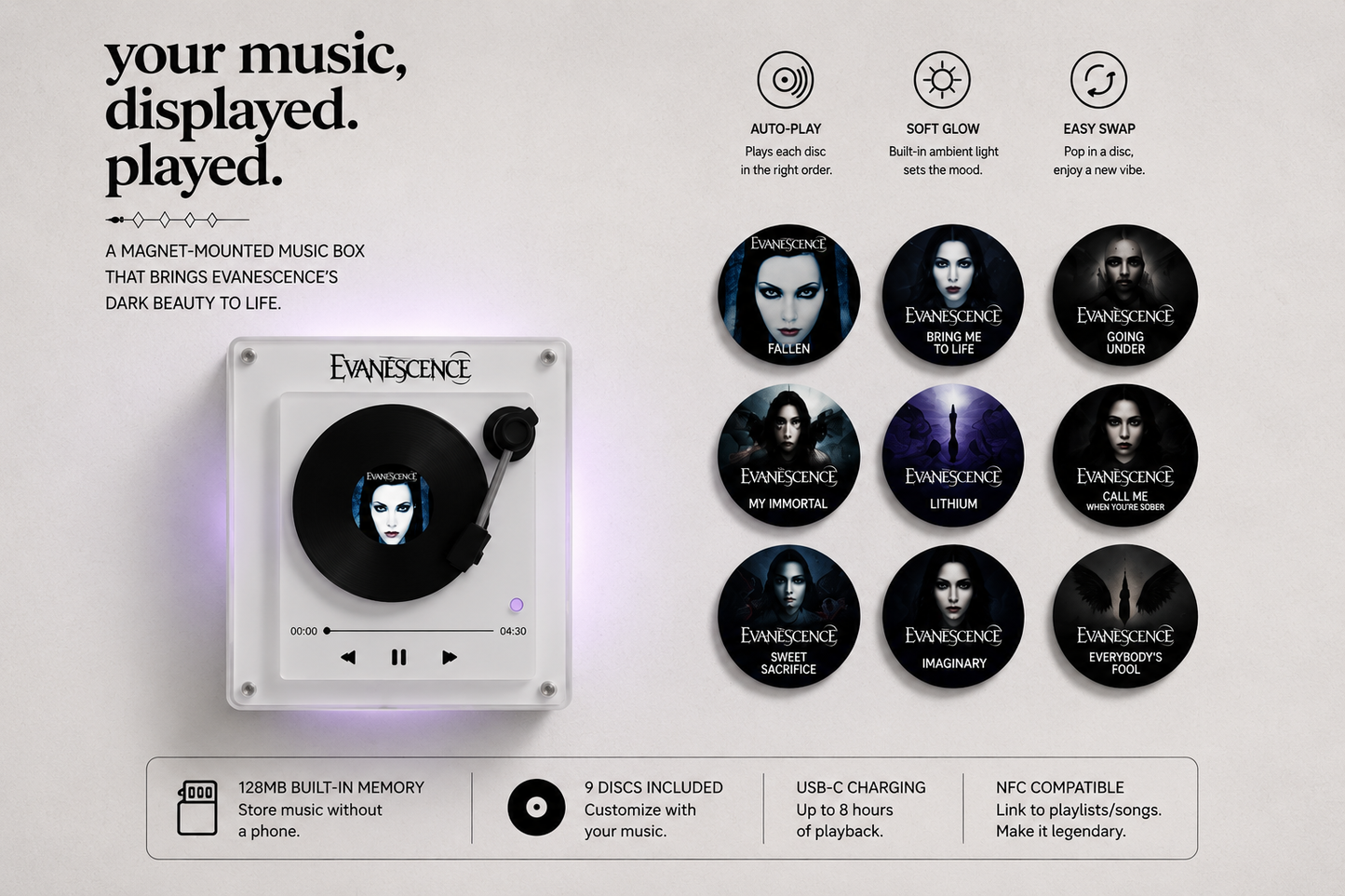
🔄 Swap Moods Instantly
💡 Immersive Light Effects
🎵 Instant, Effortless Playback
🔄 Swap Moods Instantly
💡 Immersive Light Effects
🎵 Instant, Effortless Playback
🔄 Swap Moods Instantly
💡 Immersive Light Effects
🎵 Instant, Effortless Playback
🔄 Swap Moods Instantly
💡 Immersive Light Effects
🎵 Instant, Effortless Playback
🔄 Swap Moods Instantly
💡 Immersive Light Effects
🎵 Instant, Effortless Playback
🔄 Swap Moods Instantly
💡 Immersive Light Effects
🎵 Instant, Effortless Playback
🔄 Swap Moods Instantly
💡 Immersive Light Effects
🎵 Instant, Effortless Playback
🔄 Swap Moods Instantly
💡 Immersive Light Effects
🎵 Instant, Effortless Playback
🔄 Swap Moods Instantly
💡 Immersive Light Effects
🎵 Instant, Effortless Playback
🔄 Swap Moods Instantly
💡 Immersive Light Effects
🎵 Instant, Effortless Playback
🔄 Swap Moods Instantly
💡 Immersive Light Effects
🎵 Instant, Effortless Playback
🔄 Swap Moods Instantly
💡 Immersive Light Effects
🎵 Instant, Effortless Playback

Play your favorite songs instantly
Tap your disc, place it in, and your favorite tracks start playing right away. It’s a more personal way to enjoy the music you love.

Turn any space into a vibe
Add music to your routine without even thinking about it. Whether it’s on your fridge or desk, it becomes part of your space — not just something you open on your phone.
Questions?
We've Got Answers
Customisation guide
Customisation guide
Adding your own song to the Fridge Vinyl is simple and takes less than a few minutes.
Step 1 — Connect to your computer
Use the included USB-C cable to connect the music box to your laptop or PC.
Step 2 — Open the folder
A folder named “NO NAME” will appear on your computer.
Step 3 — Select your disc slot
Inside, you’ll see folders labeled 1–9, each matching one magnetic disc.
Step 4 — Match the number
Check the number / symbol on the back of the disc and use the matching folder.
View Disc Character Guide
Step 5 — Upload your song
Drag your MP3 file into the correct folder.
Step 6 — Enjoy your music
Safely eject the device, attach the disc, and your selected song is ready to play.
What's Included?
What's Included?
- 1 EchoVinyl music box
- 9 customized photo discs
- USB-c cable to import music
- premium keepsake box
Can I change the song later?
Can I change the song later?
Yes — you can easily import and change the song anytime using the included step-by-step
Do I need my phone to use it?
Do I need my phone to use it?
Nope, everything works on its own so you don’t have to keep reaching for your phone.
How does the FridgeVinyl™ actually attach to my fridge?
How does the FridgeVinyl™ actually attach to my fridge?
The FridgeVinyl™ is magnet-mounted, meaning it attaches directly to any magnetic surface with no drilling, no tools, and no damage to your walls or appliances. Simply place it, load your disc, and it is ready to go.
Do the discs automatically rotate and light up when a song plays?
Do the discs automatically rotate and light up when a song plays?
Yes — every time you place a disc in, the FridgeVinyl™ activates an automatic rotation effect along with built-in soft lighting that syncs with your music, creating an immersive visual and audio experience right on your fridge.
Over 1,000 Vinyls Sold, Here's What Our Customers Are Saying
-

★★★★★
"My Husband Was Speechless"
"Bought this as a birthday gift for my husband who is a huge music lover and he literally stopped mid-sentence when he saw it. We have nine discs loaded up and rotate them based on our mood every single night. Best purchase we have made in years."
-

★★★★★
"This Thing Feels Like the Future"
"I have had this on my fridge for three weeks now and I genuinely cannot imagine my kitchen without it. The rotation effect, the soft glow, the way it just plays the second you drop the disc in — it feels like something out of the future. Absolutely obsessed."
-

★★★★★
"Guests Cannot Stop Asking About It"
"The build quality on this thing is insane for the price. It sits perfectly on our stainless steel fridge, the magnets are incredibly strong, and the lighting effect at night is honestly gorgeous. Our guests will not stop asking about it every time they come over."


See Us on Facebook Too!
-

1 week ago
I was skeptical at first because I thought it would be gimmicky but this is genuinely one of the coolest products I have ever owned. The auto-play the moment the disc drops in is so satisfying. It has completely changed the vibe of our entire kitchen.

5.2k
130 Comments
LikeCommentShare -

2h ago
Got this as a gift and everyone kept asking where it was from. Looks super clean in person and I use it everywhere!

1.1k
26 Comments
LikeCommentShare -

2h ago
The quality honestly surprised me. Feels really solid, looks super clean, and I’ve been using it every day. Way better than I expected.

726
15 Comments
LikeCommentShare


